PPSM: Program, Project and Service Management
Piping Technology & Products has partnered with Bechtel and Intergraph to create a library of standard library parts which can be used by the PDS Pipe Supports Module (developed jointly by Intergraph and Bechtel). Instructions on how to install PT&P’s reference tables, user functions, and forms are included below. If you have any questions regarding the installation of PT&P’s product library under PDS and PPSM, please submit your inquiries via the online contact form or contact us at info@pipingtech.com
Installation Documents for PT&P Supports in PDS PPSM:
- How to Place Supports
- Loading Forms
- Loading Reference Tables
- Loading Tutorial Definition Forms
- Loading User Functions
How PPSM fits in the plant design system
Plant owners and operators often require a model of their plant. A three-dimensional model helps to visualize the plant and reduces construction and operational problems, thereby reducing building and operation costs. An accurate model of pipe supports helps plant operators to determine interferences before they occur. Pipe supports will also have a better tracking method where quantities are accurately kept. The graphic representation of the supports can occupy an approximate volume or be drawn to include minute details.
In the past, the modeling of pipe supports has been neglected or handled by manual methods in PDS. With a pipe support module included in PDS, PPSM, each company can develop its own standards as well as use existing vendor support standards for a more complete and detailed plant model. PT&P has included basic dimensional tables of PT&P supports into PDS and developed basic code for standard supports. Our clients may modify these tables and code to suit their own labeling formats. Models of the pipe supports help owners, operators, and constructors to better design and operate their plant.
Summary of how to load PT&P code
Step 1: Load PT&P symbol processors and user functions
- The following path as shown will navigate you through the code loading process:
- PDShell => Reference Data Manager => Graphic Commodity Library Manager => Create/Interactive Data => Toggle from Single to List => Enter ptpsupports.lis => Accept by clicking the check mark.
- Please refer to “Loading User Functions” for details and bitmaps.
Step 2: Load PT&P dimensional tables
- The following path as shown will navigate you through the table loading process:
- PDShell => Reference Data Manager => Physical Data Library Manager => Select U.S. Practice and accept form => Toggle from Single to List => Enter ptptables.lis => Accept by clicking the check mark.
- Please refer to “Loading Tables” for details and bitmaps.
Step 3: Load PT&P forms and table definition files
- The following path as shown will navigate you through the tdf loading process.
- PDShell => Reference Data Manager => Support Tutorial Definition Manager => Create Data => Toggle from Single to List => Enter ptptdf.lis => Accept by clicking the check mark.
- Please refer to “Loading Forms” for details and bitmaps.
- Copy all forms to the default directory for forms delivered with PDS: \win32app\ingr\pdshell\forms.
- Please refer to “Loading Forms” for details on how to load forms.
Step 4: Load PT&P table reference database
- The following path as shown will navigate you to reference table 240.
- PDShell => Reference Data Manager => Piping Job Specification Manager => Pipe Support Group Data (Table 240) => Report/Replace
- Make sure to make a Report of the existing table 240 first. Then copy and paste any additional items such as the PT&P supports into the file that was reported from the delivered table 240. Once the PT&P items have been added to the delivered Table 240, the new table can be loaded into PDS by choosing the Replace option. This procedure to add components to the already existing tables is the same for Tables 240-243 and may or may not be necessary depending on the existing components.
- Please refer to “Loading Reference Tables” for details and bitmaps.
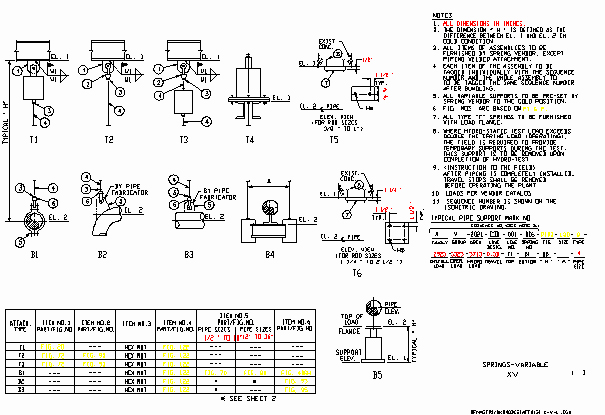
PLACING PT&P VARIABLE SPRING HANGERS IN PDS
RH FORM
LOAD —————————— Enter load in pounds as an integer ( 1000 ) without PT&P tare weight included
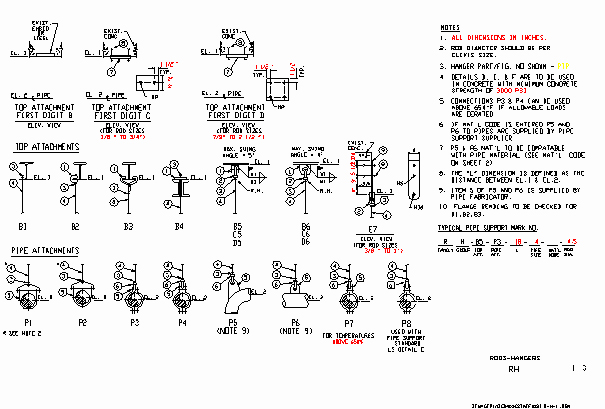
PIPE ATTACHMENT ————
P1 is an adjustable clevis hanger
P2 is an adjustable clevis hanger for insulated lines
P3 is a two-bolt pipe clamp light or heavy duty
P4 is a three-bolt pipe clamp light or heavy duty
P5 is a pipe lug attached to an elbow
P6 is a pipe lug attached to the pipeline
P7 is a three-bolt alloy pipe clamp for high temperatures
BEAM ATTACHMENT ———–
B1 is attached by point in space to the beam flange
B2 is attached by point in space to the beam flange, C-clamp not drawn
B3 is a malleable beam clamp, PT&P Fig. 135 not drawn
B4 is attached by point in space to the top of the washer plate
B5 is a welded beam attachment, PT&P Fig. 20
C5 is same as B5 plus a 4×9 plate bolted to concrete
D5 is same as B5 plus a 12×12 plate bolted to concrete
B6 is a welding lug, PT&P Fig. 72
C6 is same as B6 plus a 4×9 plate bolted to concrete
D6 is same as B6 plus a 12×12 plate bolted to concrete
ROD HANGER OPTIONS
VARIABLE HANGER OPTIONS